
Home About Me Resume
CASE STUDY
Game Code 101
OCAD University · DIGF-1007: Introduction to Game Design · Fall 2025
My role
Teaching Assistant · Game Code workshop preparation
Build one interaction, then explain it
I organised my Game Code preparation around a small playable space: movement, collision, a coin and visible feedback. The walkthrough gives learners a shared example, then the open-lab task asks them to make an interaction and explain the rules and variables behind it.
Tool: GameMaker
Main route: GML Visual, with matching GML Code options
Independent task: An interaction video lasting 10 to 20 seconds, with at least one Rules + Variables = Behavior explanation
Course materials credit: Professor C. Mcglade; Teaching Assistants Y. YI and H. Zhao
What this case covers
I prepared a Game Code workshop sequence that connects a working GameMaker example to an independent interaction and a short explanation of its rules and variables.
Break an interaction into its parts
I used Rules + Variables = Behavior to give the workshop a way to explain an interaction before introducing syntax.
A rule has two parts: a trigger, which determines when something happens, and an execution, which describes what the game does. Pressing a button and moving the player make that distinction concrete.
Variables supply the values the rule works with. Behavior is the result the player can see or hear.
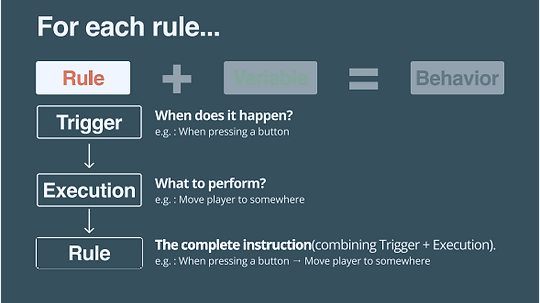
Breaking a rule into its trigger and execution. Course slide, p. 8.
I used Rules + Variables = Behavior to give the workshop a way to explain an interaction before introducing syntax.
I used Rules + Variables = Behavior to give the workshop a way to explain an interaction before introducing syntax.

First view


Second view

I used Rules + Variables = Behavior to give the workshop a way to explain an interaction before introducing syntax.
Change a value, then build an interaction
I planned the practice around changing a working example: movement speed, wall collision and a coin pickup. Each step asks learners to connect a change in the project to something they can see or hear.
GML Visual is the main route through the walkthrough. Matching GML Code snippets give learners with coding experience another way to follow the same interaction.
The guided example provides a starting point for the independent task.
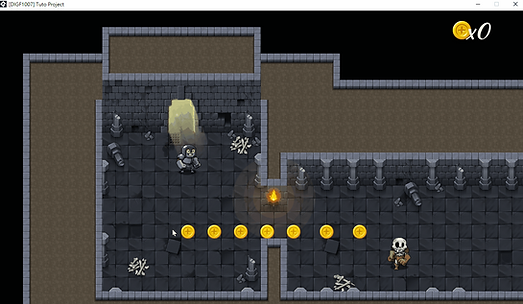
Course-preparation coin pickup demo: the top-right count rises from 0 to 7 as coins disappear and gold sparks appear. Six seconds, silent. Starter project: GameMaker's Hero's Trail.
I planned the practice around changing a working example: movement speed, wall collision and a coin pickup. Each step asks learners to connect a change in the project to something they can see or hear.
I planned the practice around changing a working example: movement speed, wall collision and a coin pickup. Each step asks learners to connect a change in the project to something they can see or hear.
First view
Second view
I planned the practice around changing a working example: movement speed, wall collision and a coin pickup. Each step asks learners to connect a change in the project to something they can see or hear.
Change an existing behavior
The plan starts with the player's Create event. Changing the speed value gives a small, visible example of how a parameter affects movement.
Inspect what blocks the player
The next step examines the starter project's wall-collision objects and adjusts a wall's collision area. This separates the visible artwork from the area used for collision.
Find the object, event and actions
In the slides, obj_coin responds to a collision with obj_player. Its action sequence creates an effect, plays audio and destroys the coin instance. The lesson examines the score assignment separately through the coins variable and its Relative setting.

In obj_coin, a collision with obj_player runs the effect, audio and instance-destruction actions. Course slide, p. 60.
Add to the count or replace it
The assignment uses coins with a value of 1. With Relative checked, it adds 1 to the stored value. Without Relative, it replaces that value with 1.
If coins is already 2, adding 1 produces 3. Replacing the value with 1 produces 1. A pickup can still produce sound and disappear while the count fails to accumulate.

Check the event and the value separately
The worked example gives learners two checks:
Identify the collision event and the feedback actions it runs.
Inspect the coins assignment and whether Relative is enabled.
A further pickup should increase an accumulating count again. Connecting that result to the rule, variable and visible behavior makes the explanation specific.
Give the open lab a starting point
I planned the open lab around concrete starting points: push or break a barrel, use a lever to open a door, or build a chest interaction with support.
The submission brief asks for an interaction video lasting 10 to 20 seconds and at least one Rules + Variables = Behavior explanation.
The template connects the trigger and action to the variable's name, type and source, then asks what changes for the player.
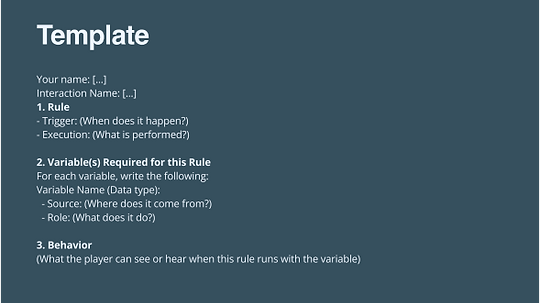
The explanation template pairs a playable result with the rule and variables behind it. Course slide, p. 68.
I planned the open lab around concrete starting points: push or break a barrel, use a lever to open a door, or build a chest interaction with support.
I planned the open lab around concrete starting points: push or break a barrel, use a lever to open a door, or build a chest interaction with support.
First view
Second view
I planned the open lab around concrete starting points: push or break a barrel, use a lever to open a door, or build a chest interaction with support.
A supported chest example
The preparation notes outline a chest with a player-collision event and an E-key check. An integer, coins_to_give, controls the reward. A relative assignment adds that value to the player's coins, and the chest changes to an opened instance.
Explain the interaction
The explanation template asks learners to identify:
When the rule runs and what it does.
The variable's name and data type.
Where the value comes from and what it controls.
What the player can see or hear when the rule runs.
Choose an extension or map the behavior
The preparation notes give learners the option to extend the tutorial interaction or explain it through a behavior mapping.
A later teaching reflection
In a later TA-training reflection, I shifted my focus from fitting in more content to helping learners take a manageable first step. I wrote about learner agency and planning in a familiar language before explaining an idea in clear English.
For a future class, I proposed two stages:
Build the smallest working version.
Make one revision, then explain the choice and how it was tested.
I wanted the activity to show where learners could begin independently, how they explained their understanding and what they would try next.